Acer Chromebook Tab 311 Review: Versatile 2-in-1 Chromebook Tablet
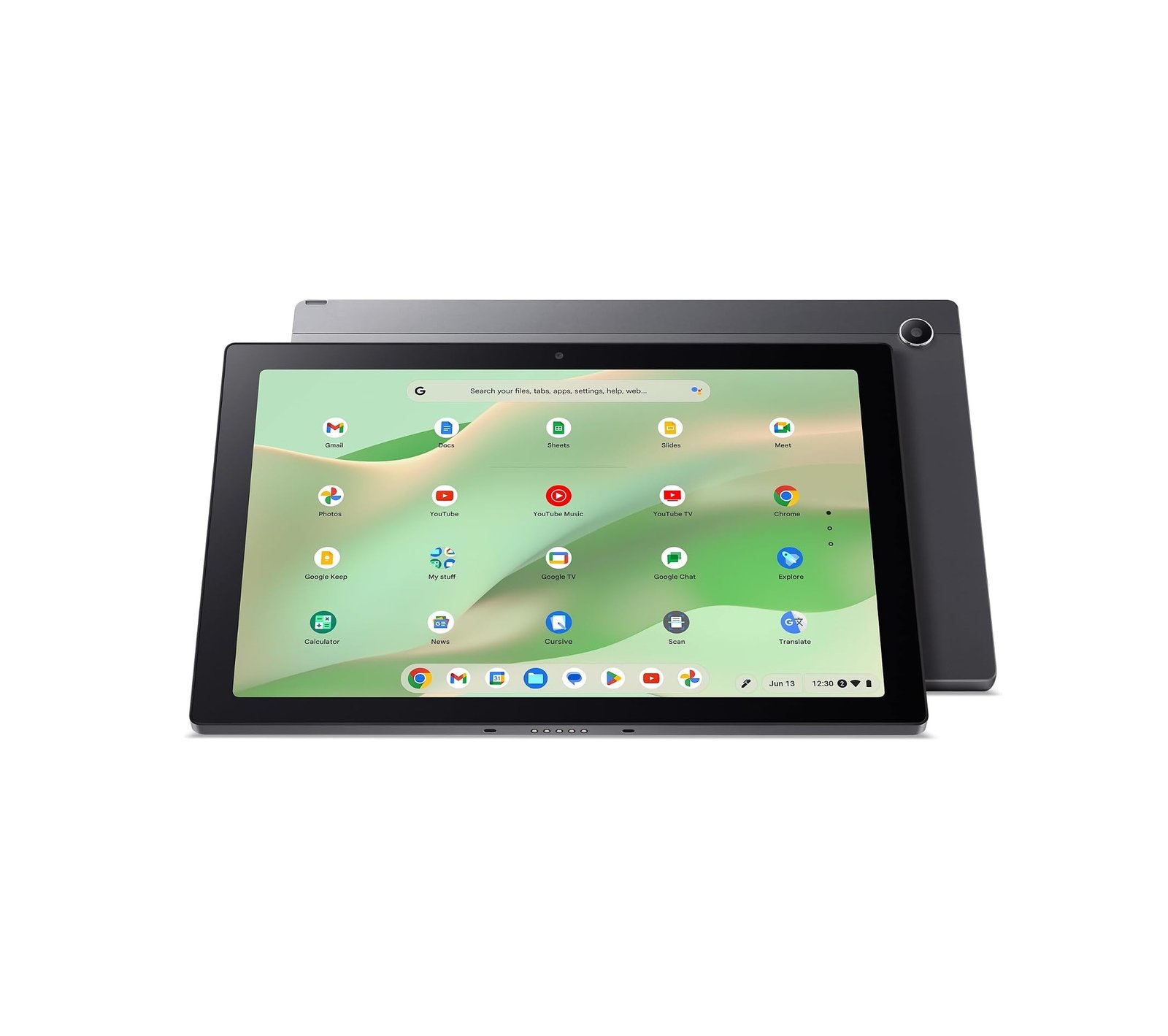
The Acer Chromebook Tab 311 CW311-3HN-K5BX is an 11-inch detachable Chromebook designed for students, browsing, streaming, note-taking, and light productivity.
It combines a MediaTek Kompanio 520 processor, 8GB LPDDR4X RAM, 128GB eMMC storage, and a 1920 × 1200 touchscreen with an included detachable keyboard and stylus.
Acer Chromebook Tab 311 Specs
| Feature | Specification |
|---|---|
| Display | 10.95-inch IPS Touch |
| Resolution | 1920 × 1200 WUXGA |
| Refresh Rate | 60Hz |
| Processor | MediaTek Kompanio 520 |
| CPU | Octa-Core |
| Graphics | ARM Mali-G52 |
| RAM | 8GB LPDDR4X |
| Storage | 128GB eMMC |
| Wireless | Wi-Fi 6 |
| Bluetooth | Bluetooth 5 |
| Battery Life | Up to 10 Hours |
| Weight | 1.34 lb / 610g tablet |
| OS | ChromeOS |
| Keyboard | Detachable Keyboard Included |
| Stylus | Acer Active Stylus Included |
Display
The Chromebook Tab 311 features a 10.95-inch 1920 × 1200 IPS touchscreen with a 16:10 aspect ratio.
The WUXGA resolution is excellent for a compact Chromebook and works well for:
- YouTube and streaming
- Web browsing
- Reading
- Google Docs
- Online classes
- Handwritten notes
The detachable design also means you can quickly switch between laptop and tablet use.
Performance
The MediaTek Kompanio 520 is an entry-level ARM processor designed primarily for lightweight ChromeOS devices.
Combined with 8GB RAM, it works well for:
- Chrome browsing
- Gmail
- Google Docs
- Google Classroom
- YouTube
- Video calls
- Android apps
- Light multitasking
Independent testing found everyday browsing, Google Docs, and video playback responsive, although benchmark performance is relatively low compared with more powerful modern tablets.
This is not a Chromebook for demanding professional workloads.
8GB RAM
The 8GB LPDDR4X RAM is one of the better features of this configuration.
Many inexpensive Chromebooks still include only 4GB RAM, so 8GB gives the Tab 311 more room for multiple browser tabs, Android apps, and everyday multitasking.
128GB eMMC Storage
You get 128GB of eMMC storage.
That’s relatively generous for a Chromebook and provides space for offline documents, Android apps, photos, and downloaded media.
However, eMMC storage is generally slower than the NVMe SSDs found in traditional laptops.
Detachable Keyboard & Stylus
One of the biggest advantages of this configuration is the included accessories.
The package includes:
- Detachable keyboard
- Magnetic portfolio case
- Acer Active Stylus
- USB-C power adapter
The keyboard turns the tablet into a compact Chromebook laptop, while the stylus is useful for notes, drawing, annotations, and schoolwork.
Battery Life
Acer rates the Chromebook Tab 311 for up to 10 hours of battery life.
Actual runtime will depend on screen brightness, apps, Wi-Fi activity, and workload, but ChromeOS and the ARM processor are designed around low-power everyday use.
Connectivity
The Tab 311 includes:
- Wi-Fi 6
- Bluetooth
- USB-C
- DisplayPort over USB-C
- USB-C charging
The USB-C port can therefore handle charging, accessories, and an external display.
Portability
The tablet itself weighs only around 610g / 1.34 lb and is approximately 9mm thick.
That makes the Tab 311 particularly convenient for students and travelers.
It’s substantially easier to carry than a traditional 14- or 15-inch laptop.
Pros
✓ Sharp 1920 × 1200 IPS touchscreen
✓ 8GB RAM
✓ 128GB storage
✓ Detachable keyboard included
✓ Active stylus included
✓ Very lightweight
✓ Wi-Fi 6
✓ Up to 10-hour battery rating
✓ Works as both tablet and Chromebook
Cons
✗ Kompanio 520 offers basic performance
✗ eMMC storage is slower than NVMe SSD
✗ Not suitable for demanding gaming
✗ Limited professional desktop software compared with Windows
✗ Small 11-inch screen isn’t ideal for heavy multitasking
Acer Chromebook Tab 311 Rating
Performance: 7.2/10
Display: 8.5/10
Portability: 9.3/10
Battery: 8.5/10
Features: 8.7/10
Value: 8.6/10
Overall: 8.4/10
Verdict
The Acer Chromebook Tab 311 is a practical 2-in-1 Chromebook for students, browsing, streaming, and everyday productivity.
Its strongest features are the sharp WUXGA touchscreen, 8GB RAM, lightweight design, detachable keyboard, and included stylus.
Performance from the Kompanio 520 is modest, so buyers needing video editing, demanding gaming, or Windows-specific professional software should consider a more powerful laptop.
For schoolwork, Google apps, entertainment, and portable everyday computing, however, the Chromebook Tab 311 offers a useful combination of tablet flexibility and Chromebook functionality.